Windows access control can appear deceptively simple.
A user attempts to access an object. Windows checks whether they have permission. Access is either granted or denied.
Underneath that decision, however, are several interconnected security mechanisms: security descriptors, ACLs, ACEs, access tokens, privileges and, in a domain environment, Kerberos.
Understanding how these pieces fit together is important for anyone attacking or defending Windows environments.
Privileges can also supersede normal access-control decisions in certain circumstances. An account may not have explicit permission to access an object, but a privilege held within its access token may provide another route.
This is where things get interesting from an offensive security perspective.
For this post, I like to think of privileges as the Big Bad Wolf, while ACLs, DACLs and ACEs are the Three Little Pigs.
The pigs build the house and decide who should be allowed through the door.
The wolf looks for another way in.

Note: This post focuses primarily on how the Windows security model fits together rather than providing step-by-step exploitation instructions. Where appropriate, I’ve included examples of how these concepts can become relevant during penetration tests and red team engagements.
A Primer on Windows Access Control
Access Control Lists (ACLs) are a fundamental part of the Windows access-control model.
They are used to control access to securable objects such as files, directories, registry keys, services and Active Directory objects.
At a high level, Windows needs to answer a simple question:
Is this security principal allowed to perform this action against this object?
Answering that question requires information about both the object being accessed and the security context attempting the access.
On one side we have the object’s security descriptor.
On the other we have the process or thread’s access token.
Windows evaluates the two when deciding whether access should be permitted.
Security Descriptors
Every securable Windows object has a security descriptor containing information that Windows uses to control and audit access to that object.
A security descriptor can contain:
- The owner’s SID
- The primary group SID
- A Discretionary Access Control List (DACL)
- A System Access Control List (SACL)
- Control information describing characteristics of the descriptor
The security descriptor therefore represents the security configuration protecting the object.
If the object is our little pig’s house, the security descriptor contains the rules governing who gets through the door.
Security Identifiers
Windows doesn’t fundamentally identify users and groups by their friendly names.
It uses Security Identifiers (SIDs).
A SID is a unique value representing a security principal such as a:
- User
- Group
- Computer account
For example:
S-1-5-21-xxxxxxxxxx-xxxxxxxxxx-xxxxxxxxxx-1105
SIDs appear throughout the Windows security model, including inside security descriptors and access tokens.
This is important because an Access Control Entry isn’t really saying:
Warren can modify this file.
It’s effectively saying:
The security principal represented by this SID has these rights against this object.
ACLs, DACLs and SACLs
There are two types of ACL associated with a Windows security descriptor.
DACL - Discretionary Access Control List
The DACL determines who is allowed or denied access to an object.
The DACL consists of individual Access Control Entries (ACEs).
Each ACE identifies a security principal and describes the access that should be allowed or denied.
Conceptually, a DACL might contain rules such as:
BUILTIN\Administrators    Full Control
CORP\Warren               Modify
CORP\Developers           Read
CORP\Contractors          Deny Write
One important distinction is that a NULL DACL means there are no access restrictions and everyone is effectively granted access.
This should not be confused with an empty DACL, which contains no ACEs and therefore grants no access.
SACL - System Access Control List
The SACL is primarily concerned with auditing rather than granting access.
It specifies which types of access attempts Windows should record in the security event log.
For example, a SACL could instruct Windows to audit unsuccessful attempts to modify a sensitive file or Active Directory object.
Access Control Entries
An ACL is made up of individual Access Control Entries (ACEs).
An ACE associates a security principal with a particular set of rights.
Depending on the object, these might include:
- Read
- Write
- Execute
- Delete
- Modify permissions
- Change ownership
Active Directory introduces many additional object-specific rights, which we’ll return to later.
ACE ordering and inheritance also matter when Windows evaluates access.
Permissions may be explicitly configured on an object or inherited from a parent object.
This means that something which appears secure at first glance may actually have permissions inherited from somewhere higher in the hierarchy.
The Other Side of the Decision: Access Tokens
The security descriptor tells Windows about the object.
But Windows also needs to know who is asking.
This information comes from the access token associated with the process or thread making the request.
When a user logs into Windows, the system creates an access token representing that security context.
An access token contains information including:
- User SID
- Group SIDs
- Privileges
- Integrity level
- Logon SID
- Token type
- Other security attributes
Processes created by the user normally receive a copy of that access token.
This is an important concept:
Windows doesn’t simply ask which user launched an application. It evaluates the security context represented by the token associated with the process or thread.
Putting the Pieces Together
Imagine I attempt to create a file on my Windows desktop.
The Desktop directory is a securable object.
It therefore has a security descriptor containing a DACL.
My process also has an access token representing my current security context.
The process looks approximately like this:
              PROCESS
                 |
                 v
          +---------------+
          | Access Token  |
          +---------------+
          | User SID      |
          | Group SIDs    |
          | Privileges    |
          | Integrity     |
          +-------+-------+
                  |
                  | Access request
                  v
          +---------------+
          |    Windows    |
          | Access Check  |
          +-------+-------+
                  |
                  v
       +----------------------+
       | Desktop Directory    |
       +----------------------+
       | Security Descriptor  |
       |        |             |
       |        +--> DACL     |
       |              |       |
       |              +-> ACE |
       |              +-> ACE |
       |              +-> ACE |
       +----------------------+
Windows compares the security information represented by the token against the security descriptor protecting the object.
If the applicable ACEs grant the requested access, the operation succeeds.
If they don’t, access is denied.
At least, that’s the simplified version.
Because now the wolf arrives.
Privileges: The Big Bad Wolf
Access tokens don’t only contain SIDs.
They also contain privileges.
Privileges grant the ability to perform particular system-level operations.
These are different from permissions granted against an individual object.
For example, Windows privileges include:
SeBackupPrivilege
SeRestorePrivilege
SeDebugPrivilege
SeImpersonatePrivilege
SeTakeOwnershipPrivilege
This distinction is important.
An ACL answers:
Can this security principal perform this operation against this particular object?
A privilege answers something closer to:
Is this security context trusted to perform this particular system operation?
Certain privileges can therefore provide capabilities that would not be available through ordinary ACL permissions alone.
This is where privileges can effectively become our Big Bad Wolf.
The DACL may have built a perfectly respectable house.
The wolf doesn’t necessarily have to use the front door.
Viewing Your Token
You can’t simply open an access token as though it were a file, but Windows provides several ways to inspect information associated with your current security context.
The easiest is:
whoami /all
This displays information including:
- User SID
- Group memberships
- Privileges
- Integrity information
You can view privileges specifically using:
whoami /priv
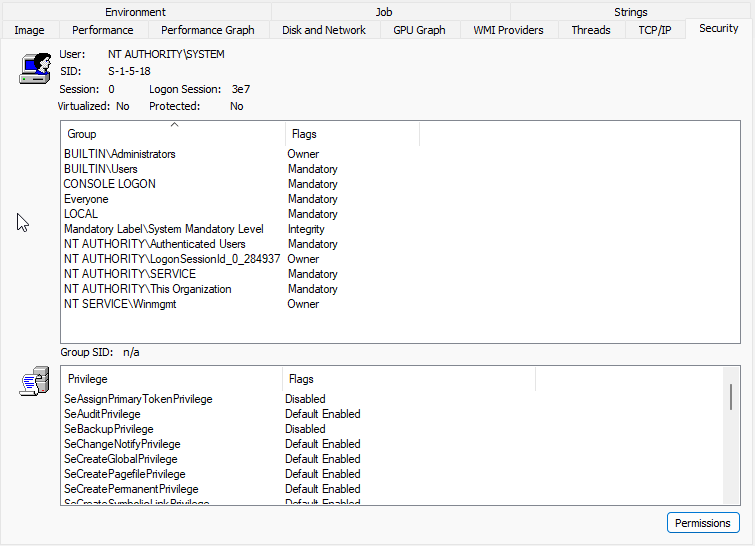
Sysinternals tools such as Process Explorer provide a much more detailed view of the tokens associated with running processes.
UAC and Split Tokens
User Account Control adds another layer to this model.
When an administrator logs on using Admin Approval Mode, Windows will typically create both a filtered token and a full administrator token.
Normal applications run using the filtered token.
When an application is elevated through UAC, the elevated process runs using the administrator’s full token.
As an experiment run whoami /priv is a standard shell vs a “Ran as Administrator” shell. You will see the difference.
This distinction is important when examining processes during a penetration test.
A user being a member of the local Administrators group does not necessarily mean every process running as that user currently possesses an unrestricted administrator security context.
Logon Sessions and LUIDs
Windows also tracks logon sessions using Locally Unique Identifiers (LUIDs).
Each logon session is assigned an authentication identifier which is unique on that system until it is restarted.
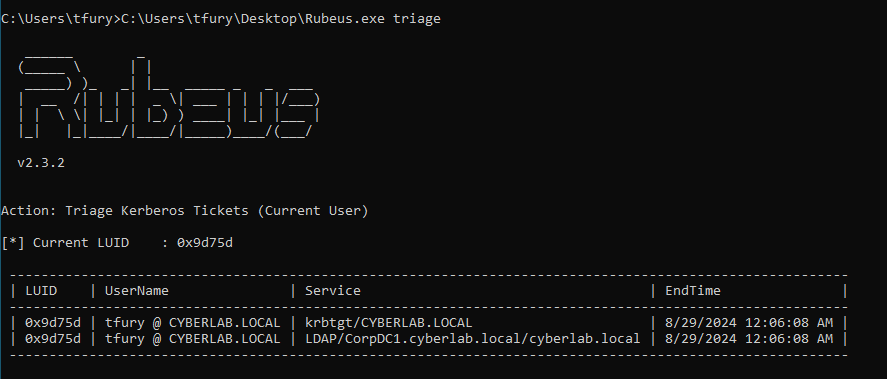
Tools such as Rubeus can display logon sessions and their corresponding LUIDs:
Operational note: Tools such as Rubeus are commonly detected by endpoint security products. Use appropriate tooling and procedures for the environment being assessed rather than disabling security controls simply to run a tool.
LUID information can also be obtained using native PowerShell/WMI:
Get-WmiObject -Class Win32_LogonSession |
    Select-Object LogonId, StartTime, LogonType
or using Sysinternals tooling such as logonsessions.
Understanding LUIDs becomes particularly useful when dealing with multiple authentication contexts and Kerberos tickets on a compromised host.
Domain Accounts and Kerberos
Domain authentication introduces another important component: Kerberos tickets.
When a domain user authenticates using Kerberos, they can obtain a Ticket Granting Ticket (TGT) from the Key Distribution Center (KDC).
The TGT can subsequently be used to request service tickets for resources such as:
CIFS
LDAP
HTTP
MSSQL
HOST
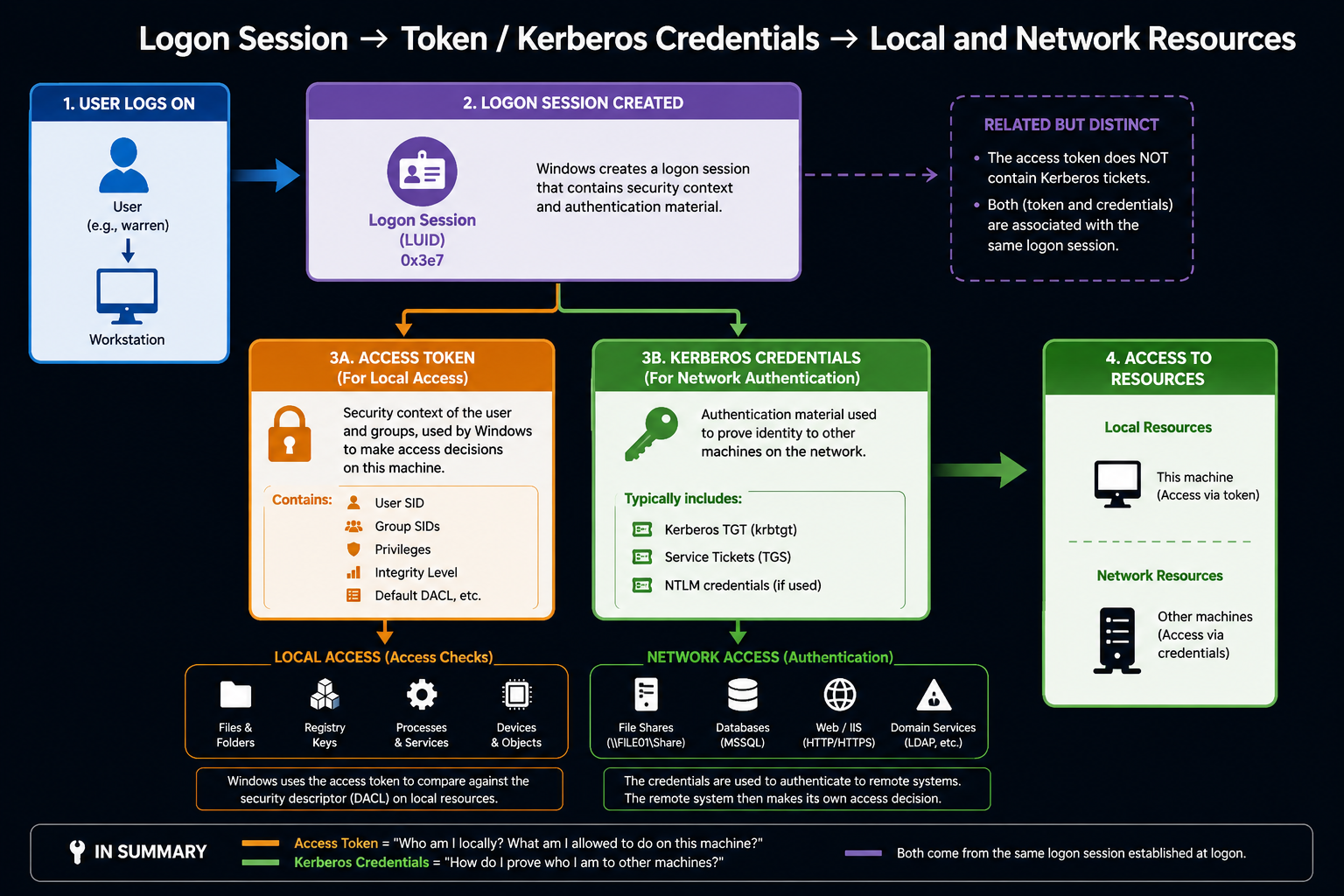
The important distinction is that an access token and a Kerberos ticket solve related but different problems.
The access token represents the security context used for local Windows authorisation decisions.
Kerberos tickets allow that identity to authenticate to services within the domain.
Together, these mechanisms allow Windows to manage both local and network authentication and authorisation.
Abusing the Model
There are countless blogs explaining exactly how to exploit individual Windows and Active Directory permissions.
Rather than reproducing those techniques step-by-step, I want to focus on why the attacks work.
Once you understand the underlying security model, many seemingly unrelated Windows attacks begin to look very similar.
An attacker is normally attempting to manipulate one of three things:
- The permissions protecting an object
- The security context accessing the object
- The privileges available to that security context
Let’s look at some examples.
Weak Active Directory Permissions
In large and mature Active Directory environments, ACLs can become extremely complicated.
Years of:
- Delegated administration
- Application installations
- Organisational changes
- Service accounts
- Migration projects
- Temporary fixes
- Poor permission hygiene
can result in unexpectedly permissive access-control relationships.
Attackers can abuse these relationships to move through an environment.
Enumerating every permission manually can be cumbersome, which is why tools such as SharpHound and BloodHound are incredibly useful for identifying attack paths.
That said, manually understanding and enumerating permissions remains an important skill.
Tooling can fail.
Tooling can be blocked.
And tooling can occasionally tell you that something is exploitable without teaching you why.
Learn both.
Commonly Abused Active Directory Rights
GenericAll
GenericAll effectively grants full control over an Active Directory object.
Depending on the target object, this could allow an attacker to perform actions such as:
- Modify group membership
- Reset passwords
- Modify attributes
- Establish additional control relationships
GenericWrite
GenericWrite allows modification of certain attributes on an object.
One particularly interesting example is writing to the:
msDS-KeyCredentialLink
attribute.
Where the appropriate conditions exist, this can enable Shadow Credentials attacks.
WriteOwner
WriteOwner allows the attacker to change the owner of a securable object.
Ownership is important because an object’s owner has particular rights relating to its security descriptor.
Changing ownership can therefore provide a route to subsequently modifying the object’s permissions and gaining additional control.
WriteDACL
WriteDACL allows modification of an object’s Discretionary Access Control List.
Instead of directly possessing the desired permission, an attacker may simply modify the DACL and grant themselves the permission they need.
This is a great example of why understanding the Windows security model matters.
You’re not necessarily breaking the access-control mechanism.
You’re changing the rules it evaluates.
AllExtendedRights
AllExtendedRights grants extended rights against an Active Directory object.
Depending on the target object, these rights may permit sensitive operations such as password resets or access to protected attributes.
ForceChangePassword
The ForceChangePassword right can allow an attacker to reset another user’s password without knowing the existing password.
While potentially useful from an attack-path perspective, forcibly changing user passwords is disruptive and is generally something I avoid during normal penetration testing unless specifically agreed with the client.
When Privileges Beat Permissions
Misconfigured ACLs are only one part of the story.
What happens if the attacker possesses a powerful Windows privilege?
Consider:
SeBackupPrivilege
Backup operators need to be able to back up files even when the normal file permissions would otherwise prevent access.
Windows therefore provides backup semantics which can allow appropriately privileged processes to access objects without relying solely on the normal DACL decision.
From an attacker’s perspective, this is extremely interesting.
The ACL hasn’t disappeared.
The attacker has obtained a security context capable of performing an operation outside the normal permission path.
The wolf didn’t knock the house down.
It found another entrance.
Other privileges worth understanding include:
SeRestorePrivilege
SeTakeOwnershipPrivilege
SeDebugPrivilege
SeImpersonatePrivilege
Each interacts with Windows security differently, but the underlying lesson is the same:
Permissions on the object are only one part of an authorisation decision. The privileges associated with the caller’s security context matter too.
Token Impersonation
This brings us naturally to token impersonation.
Windows services frequently need to perform operations on behalf of other users.
To support this, Windows provides mechanisms that allow threads to operate using an impersonation token.
This is legitimate and fundamental Windows functionality.
It is also extremely interesting to attackers.
If an attacker can obtain or impersonate a more privileged token, Windows may subsequently evaluate access requests using that security context rather than the attacker’s original identity.
Instead of modifying the house:
Rather than obtain the key, assume the identity of someone who already has it.
Privileges such as:
SeImpersonatePrivilege
are particularly important here and have historically formed part of numerous local privilege-escalation techniques.
I’m sure most people reading this are already familiar with the various Potato attacks, so I won’t go into those in detail. The important thing to remember is the difference between primary and impersonation tokens.
A primary token is assigned to a process and represents the default security context under which that process runs.
An impersonation token can be assigned to a thread, allowing that thread to temporarily act on behalf of another security principal.
This is the behaviour attackers abuse when they obtain a privileged impersonation token and have the ability to impersonate it, often with the help of SeImpersonatePrivilege.
In simple terms:
The process stays where it is, but the thread gets to borrow somebody else’s identity.
That borrowed identity may be far more privileged than the attacker’s original security context.
Creating Another Security Context
Another useful concept during Windows post-exploitation is creating a new logon session using alternative credentials.
Tools such as Cobalt Strike expose this through functionality commonly referred to as:
make_token
Behind the tooling, the important concept is not the command itself.
It’s the creation of another Windows authentication context.
This can result in a situation where:
- Your process still appears locally as your existing user
- Network authentication occurs using another identity
This distinction between local identity and network identity can initially be confusing, but it becomes much easier to understand once access tokens and logon sessions make sense.
Pass-the-Ticket
Kerberos gives us another way of manipulating the authentication context used to access domain resources.
If an attacker obtains a valid Kerberos ticket, that ticket may potentially be imported into an appropriate logon session and used when authenticating to network services.
This is commonly referred to as Pass-the-Ticket.
Again, rather than thinking:
I ran a Pass-the-Ticket command.
I find it more useful to think:
I changed the Kerberos credentials that are available to this logon session.
That makes the relationship between:
- LUIDs
- Logon sessions
- Kerberos tickets
- Access tokens
- Network authentication
much easier to understand.
Bringing It All Together
Windows access control isn’t one mechanism.
It’s a collection of interconnected security mechanisms.
An object has a security descriptor.
The security descriptor contains a DACL.
The DACL contains ACEs describing which SIDs should receive particular permissions.
A process presents an access token containing the user’s SID, group memberships and privileges.
Windows uses this information when deciding whether an operation should be permitted.
In a domain environment, Kerberos provides authentication to network services, with credentials associated with Windows logon sessions.
From an offensive perspective, this gives us several opportunities.
We can find objects where the ACL is weak.
We can modify the DACL.
We can take ownership.
We can obtain a more privileged token.
We can impersonate another security context.
We can obtain or introduce Kerberos credentials.
Or we can possess a privilege which allows us to perform an operation that normal permissions would otherwise prevent.
The individual techniques may look very different.
The underlying objective is often the same:
Change the rules, the identity being evaluated against those rules, or the capability available to that identity.
And that brings us back to our Little Pigs.
ACLs, DACLs and ACEs can build a very strong house.
But Windows security is bigger than the house.
Sometimes the Big Bad Wolf doesn’t need permission to come through the front door.
Sometimes, he just blows the house down.
Further Reading
Microsoft - Access Control Model
All techniques discussed in this post should only be used in environments where you have explicit authorisation to perform security testing.